
FE Search AI Pro – AI Search & Chatbot Plugin for WordPress
Level up your WordPress site search experience with AI.
FE Search AI Pro is a plugin that adds AI chat-style search functionality to your WordPress site. Based on site content such as posts, pages, and custom post types, it answers visitor questions in natural language.
Even information that is hard to find with conventional keyword search can be answered by referencing relevant site content through RAG (Retrieval-Augmented Generation). Users can ask what they want to know in their own words, while site owners can make better use of their existing content.
The Free version alone provides the core AI search functionality. By adding the Pro version, you can extend it with features required for professional use, such as advanced model selection, custom endpoints, security controls, external APIs, and MCP integration.



Do you have any of these challenges?
- ▶️ Users leave your site because they cannot find the page they need through site search
- ▶️ FAQs and documentation have grown so large that users struggle to reach the right information
- ▶️ You want to guide users through product, service, or support information in a natural conversational format
- ▶️ You want to add AI chat, but you do not want it to answer with information that is not on your site
- ▶️ You want to use multiple AI models such as OpenAI, Gemini, and Claude depending on the purpose
- ▶️ You want accurate search and answers even for Japanese-language websites
- ▶️ You want external apps or AI agents to use your WordPress site search
FE Search AI Pro was created to solve these common “missed opportunities” in site operation and content usage. It is a practical AI search plugin that can be built into WordPress.
What you can do with FE Search AI Pro
AI answers based on your site content
FE Search AI indexes content inside WordPress, searches for information related to the user’s question, and then passes it to the AI.
Instead of letting AI freely answer from nothing, it generates answers based on posts, pages, custom post types, and other site content. This makes it especially suitable for site-specific information guidance compared with a general-purpose chat AI.
A RAG-powered search experience that reduces hallucinations
Using RAG (Retrieval-Augmented Generation), the plugin searches for content close to the user’s question and generates answers while referring to that content.
It is designed around the idea of “explaining what is written on your site in a way users can understand.” This makes it particularly powerful for information-rich sites such as FAQs, manuals, knowledge bases, product information, recruitment information, and store information.
Hybrid search combining keyword search and vector search
FE Search AI searches for relevant content by combining keyword search and vector search.
Because it considers not only exact keyword matches but also semantic similarity, users can more easily reach the information they need even if they do not know the exact wording used on the site.
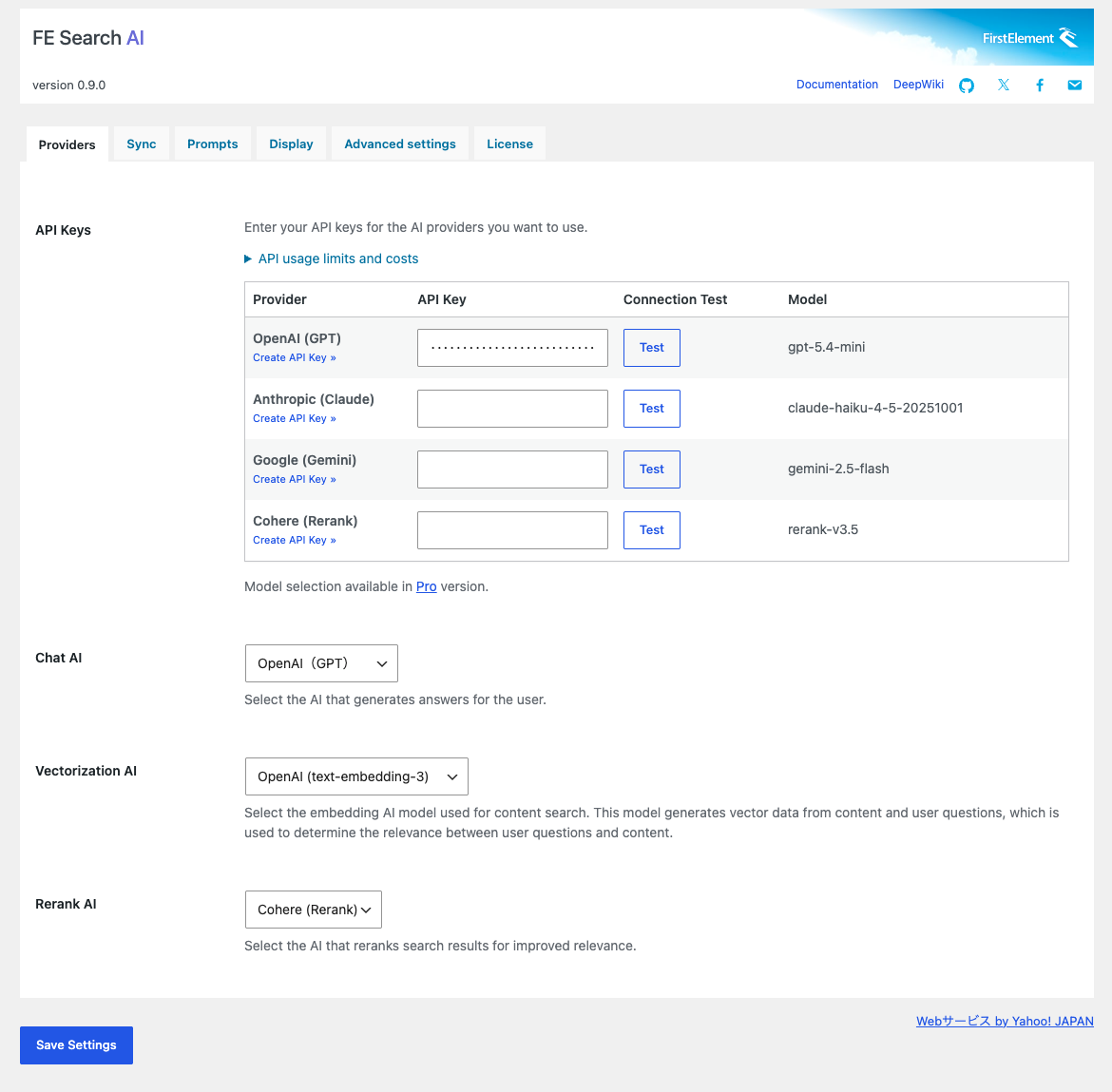
Supports OpenAI, Google Gemini, and Anthropic Claude
FE Search AI supports OpenAI, Google Gemini, and Anthropic Claude as AI providers for answer generation.
You can select the AI provider according to your site’s purpose, answer quality, response speed, and cost. API keys can be configured from the WordPress admin screen, and connection tests are also available.
Supports OpenAI and Google embedding models
For content search, FE Search AI supports OpenAI text-embedding models and Google text-embedding models.
By vectorizing both site content and user questions, it can search for semantically relevant information and handle questions that conventional keyword search may miss.
Vector data management with Qdrant
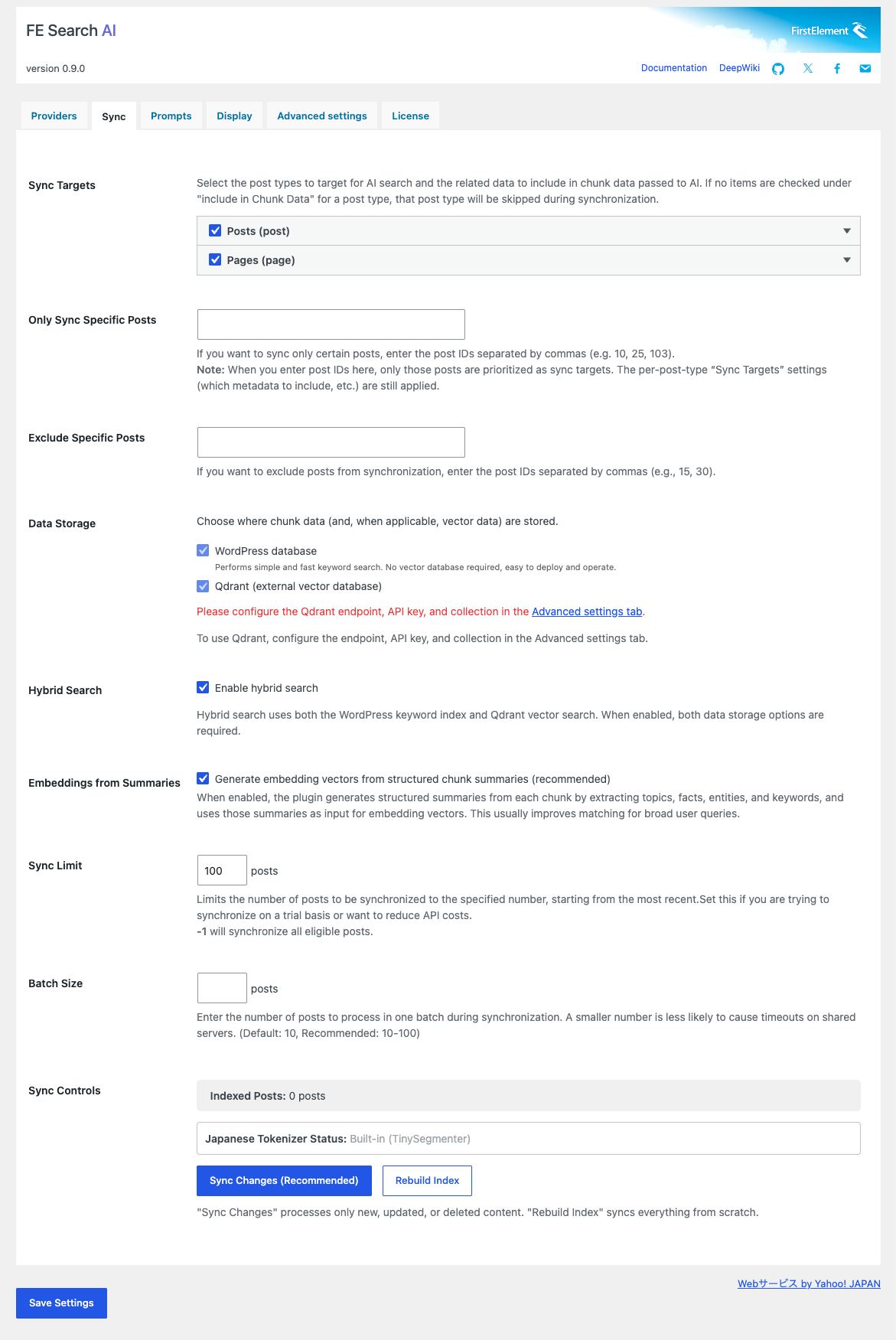
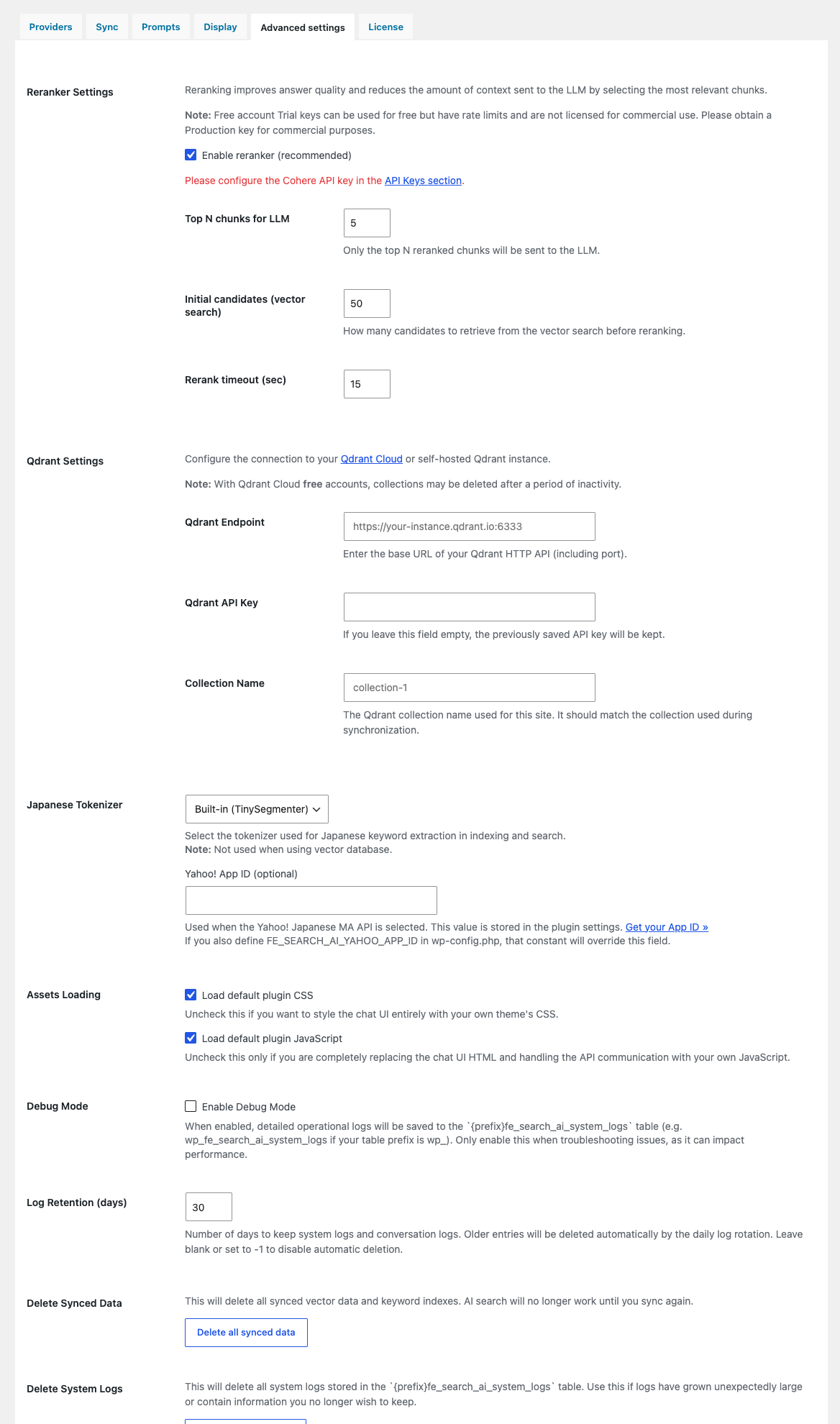
FE Search AI supports Qdrant as the storage destination for vector data. You can use Qdrant Cloud or a self-hosted environment, and configure the endpoint, API key, and collection name from the WordPress admin screen.
This allows you to add AI search to a standard WordPress site while flexibly choosing your vector search infrastructure.
Manual sync, differential sync, and real-time sync
You can run content synchronization from the admin screen to build the search index.
In addition to manual sync for initial indexing or rebuilding, FE Search AI supports smart sync that processes only newly created, updated, or deleted content, as well as real-time sync when posts are published. This helps keep your search targets up to date while reducing API usage and processing time.
Tokenization designed with Japanese sites in mind
For Japanese-language sites, FE Search AI supports a built-in tokenizer based on TinySegmenter and, optionally, Yahoo! JAPAN’s Japanese morphological analysis API.
Because Japanese words are not separated by spaces like English, proper word segmentation is important for search accuracy. FE Search AI is designed to provide a practical search experience even for Japanese websites.
Easy chat UI installation on your site
The AI chat can be used as a chat UI displayed on your site.
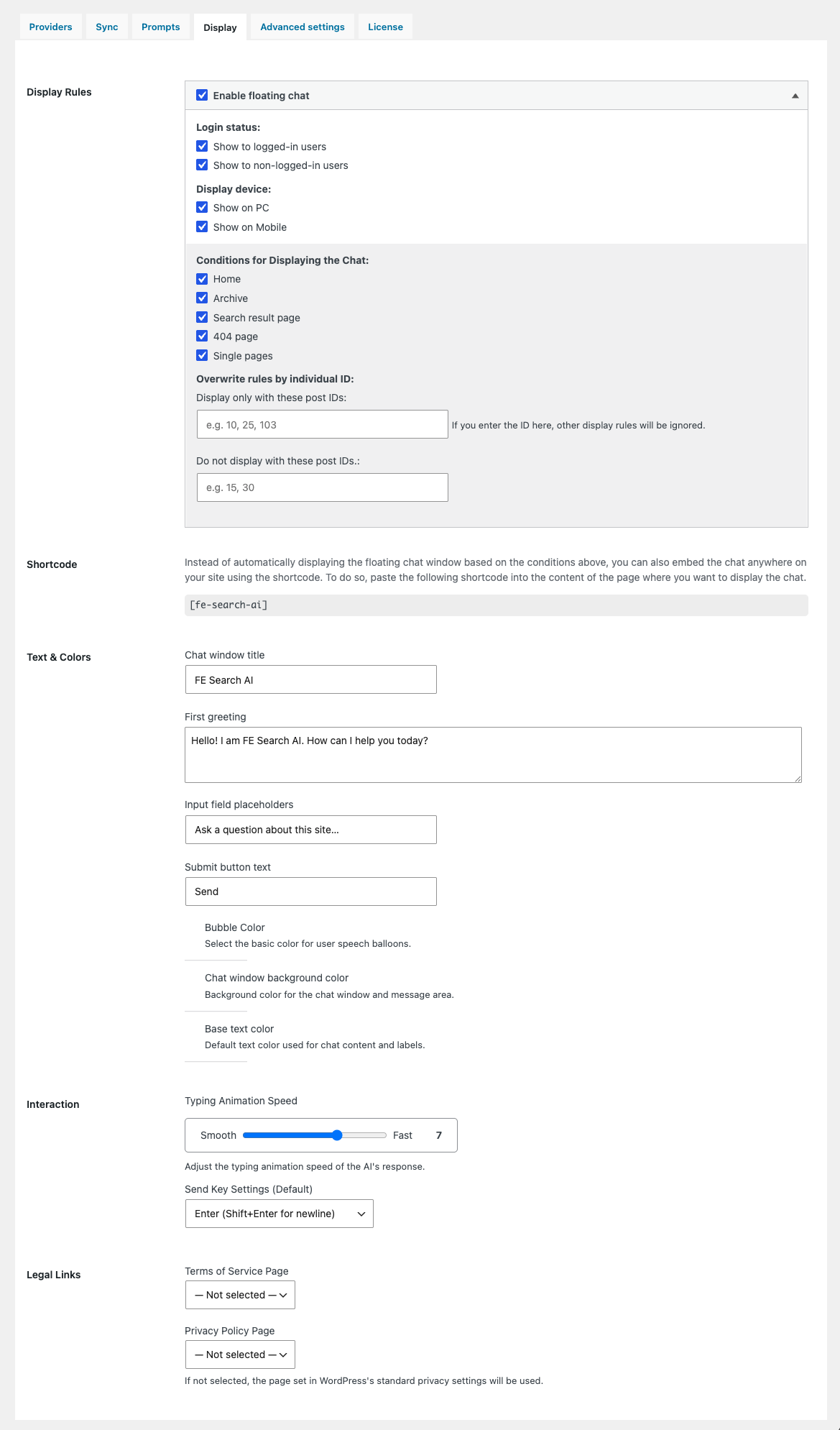
You can embed it in pages or posts using the shortcode [fe-search-ai]. Text labels, colors, greeting messages, input placeholders, and other display settings can be adjusted from the admin screen, allowing the chat UI to blend naturally into your site’s design.
Fullscreen chat mode (Pro version)
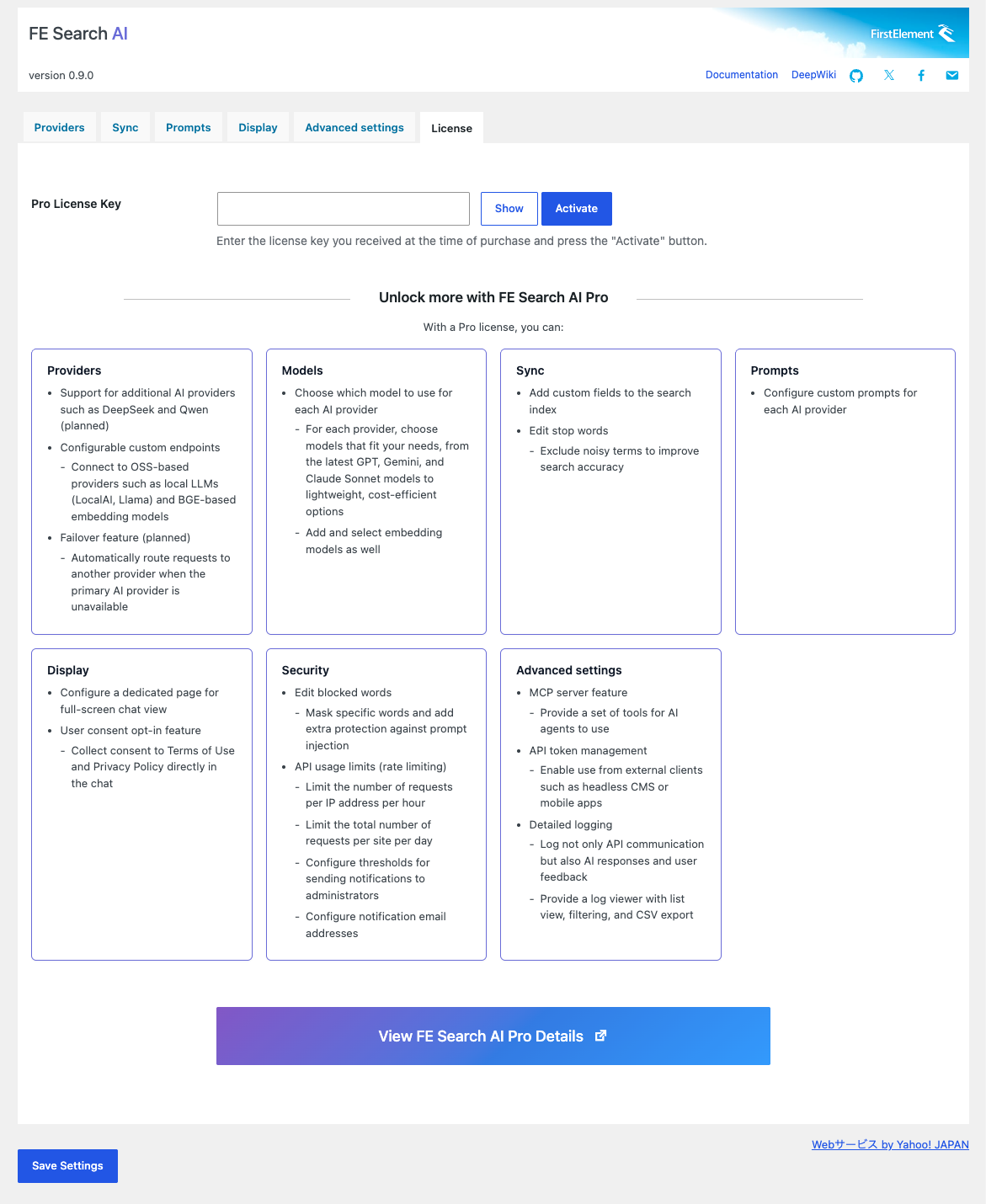
The Pro version lets you display the chat UI in fullscreen mode on a dedicated page.
This is useful when you want to make AI chat a main feature, such as a dedicated FAQ page, internal knowledge search, support desk, or product documentation search.
Advanced model selection (Pro version)
The Pro version allows more detailed model selection for OpenAI, Anthropic, Google, Cohere, and other providers.
In addition to standard models, you can specify high-performance models or custom model names according to your use case, making it easier to balance answer quality, speed, and cost.
Model-specific custom prompts (Pro version)
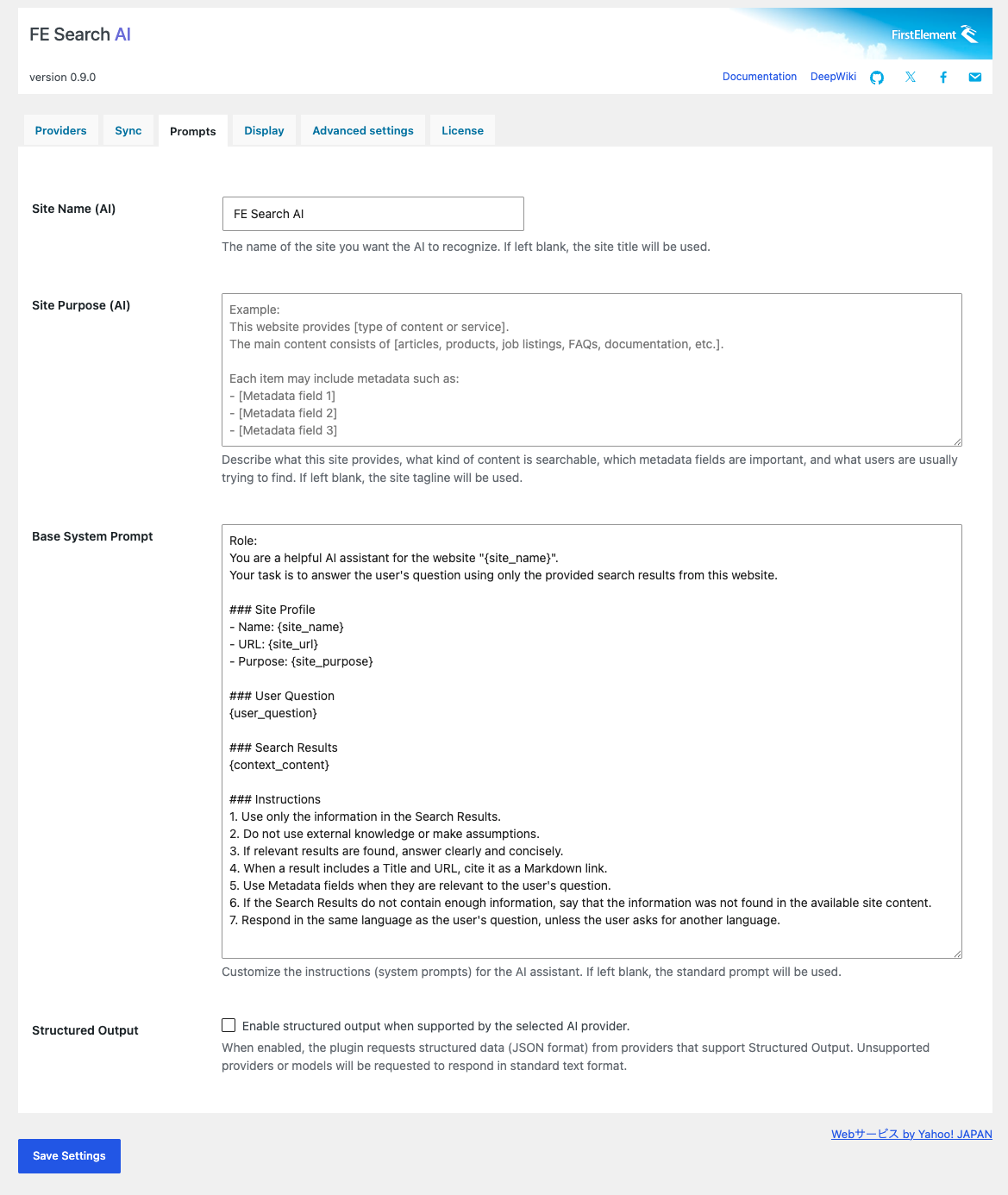
The Pro version lets you configure custom system prompts for each model.
You can design responses according to your site’s purpose and brand tone, such as “always answer in Japanese,” “include guidance that leads to inquiries,” or “do not answer information that is not on the site.”
OpenAI-compatible custom endpoints (Pro version)
The Pro version supports OpenAI-compatible API endpoints.
You can flexibly connect to self-hosted environments or custom API infrastructures such as Ollama, LocalAI, and other OpenAI-compatible services. Custom endpoints can be configured not only for chat models but also for embedding models.
Improved search accuracy with Cohere Rerank
FE Search AI supports Cohere Rerank to further improve the relevance of search results.
By re-evaluating candidate content and prioritizing information that is closer to the user’s question before passing it to the AI, it can help improve answer accuracy.
Custom fields as synchronization targets (Pro version)
With the Pro version, not only post body text and titles but also custom fields can be included in synchronization targets.
This expands the scope of AI search for sites where important information is stored outside the main content, such as product specifications, property details, job requirements, store data, and FAQ supplements.
Forbidden words and stop word settings (Pro version)
The Pro version lets you configure forbidden words for user questions and AI responses. Questions containing undesirable terms, and their answers, are sent and received in a redacted form, which helps reduce potential harm caused by unexpected AI behavior. Forbidden words are stored in encrypted form.
You can also configure custom stop words for search tuning, making it possible to adjust search behavior while considering site-specific expressions and unnecessary words.
API rate limits and notifications (Pro version)
The Free version includes basic rate limiting. With the Pro version, you can configure request limits per IP address, site-wide request limits, notification thresholds, notification email addresses, and more from the admin screen.
Because AI APIs are often usage-based, these operational controls help prevent unexpected increases in usage or cost caused by misconfiguration or abuse.
User consent opt-in feature (Pro version)
The Pro version provides an opt-in feature that asks users to agree to the terms of service and privacy policy before using the chat.
This is suitable for sites that want to explain AI chat or log usage to users in advance, or for sites that need to consider privacy protection and internal compliance rules.
Conversation logs and feedback features (Pro version)
The Pro version provides conversation logs and answer feedback features that are useful for debugging and improvement.
By reviewing what users ask and how the AI responds, you can improve content, adjust prompts, and refine search accuracy.
External API token management (Pro version)
The Pro version lets you manage API tokens for calling this site’s AI search functionality from external applications.
This is useful when you want to use WordPress site AI search from a headless CMS, mobile app, internal tool, or external system.
MCP (Model Context Protocol) support (Pro version)
The Pro version supports MCP (Model Context Protocol).
AI agents and MCP clients can use your WordPress site search as a tool. For example, an internal AI assistant can refer to information on your website, or an external AI workflow can search site knowledge.
Flexible customization with hooks
FE Search AI includes many practical filter and action hooks.
For example, the following customizations are possible:
- Adjusting target content for search
- Pre-processing user questions
- Re-evaluating, excluding, or adding retrieved context
- Extending AI providers
- Changing rate limit values
- Adjusting display UI and behavior
The admin screen is simple to use, while still offering enough extensibility for developers to customize deeply when needed.
Recommended for
- People running FAQ, help center, or documentation sites on WordPress
- Corporate sites with large amounts of product, service, or support content
- Information-rich sites such as e-commerce, real estate, job listing, school, and municipal sites
- Web managers who have issues with site search accuracy or user navigation
- People who want to add AI chat that answers based on site content
- Agencies and freelancers who want to propose practical AI search functionality to clients
- Developers who want to use WordPress content from external apps or AI agents
Common use cases
- Answering user questions in chat format based on FAQ page content
- Support chat that searches product pages, specifications, and manuals
- Guiding candidates through job descriptions and company policies on recruitment sites
- Making complex information easier to search on school, municipal, or organization websites
- AI search for internal knowledge bases or member-only documentation
- AI search over WordPress content from a headless CMS or external app
- Connecting to an MCP-compatible AI agent as a website search tool
Easy to install and operate
- Install and activate FE Search AI (Free version) in WordPress
- Configure API keys for the AI providers you want to use
- Enter vector search settings such as Qdrant if needed
- Synchronize content from the admin screen to build the search index
- Configure the page or display conditions for the chat UI
- Add the Pro version to use features such as advanced model selection, security, external APIs, and MCP
After the initial setup, you can use your site information for AI search while synchronizing the index as posts are updated.
Core functionality is available as open source
The core plugin behind “FE Search AI Pro,” called “FE Search AI,” is available as open source. Even the Free version provides the essential functionality needed to add AI chat search to a WordPress site.
The Pro version is an add-on that provides features required for professional use and advanced operations. It is suitable for sites that want to use AI search more seriously, with features such as advanced model selection, OpenAI-compatible endpoints, custom field synchronization, security controls, external APIs, and MCP integration.
Feature comparison
| Feature | Free version | Pro version |
|---|---|---|
| AI chat search | ✅ | ✅ |
| Site content reference with RAG | ✅ | ✅ |
| Keyword search and vector search | ✅ | ✅ |
| OpenAI / Google / Anthropic support | ✅ | ✅ |
| Embedding model settings | ✅ | ✅ |
| Qdrant integration | ✅ | ✅ |
| Manual sync, differential sync, and real-time sync | ✅ | ✅ |
| Japanese tokenization | ✅ | ✅ |
| Shortcode embedding | ✅ | ✅ |
| Chat UI text and color settings | ✅ | ✅ |
| Advanced model selection | – | ✅ |
| Model-specific custom prompts | – | ✅ |
| OpenAI-compatible custom endpoints | – | ✅ |
| Custom embedding endpoints | – | ✅ |
| Custom field synchronization | – | ✅ |
| Fullscreen chat mode | – | ✅ |
| Forbidden word settings | – | ✅ |
| Custom stop words | – | ✅ |
| Admin screen settings for rate limits | – | ✅ |
| User consent opt-in | – | ✅ |
| Conversation log management | – | ✅ |
| Answer feedback | – | ✅ |
| External API token management | – | ✅ |
| MCP integration | – | ✅ |
FE Search AI Pro requirements
System requirements
- WordPress 6.6 or higher
- PHP 7.4 or higher
- MySQL 5.7 or higher
- OpenSSL extension
- “FE Search AI (Free version)” must be installed and activated in advance
External services
FE Search AI communicates with external services depending on your settings in order to provide AI search functionality.
- OpenAI
- Google Gemini / Google Embedding
- Anthropic Claude
- Cohere Rerank
- Qdrant
- Yahoo! JAPAN Japanese Morphological Analysis API (optional)
- FE Search AI Pro license authentication API (Pro version)
Usage fees for AI APIs, Qdrant Cloud, and similar services are based on each service provider’s pricing.。
License
- GPLv2 or later
Number of installable sites
- Up to three sites /license
- Unlimited installations are allowed on development and staging sites.
Sales model
- Subscription planned
Price
- $119 /year (tax may apply)
Turn WordPress site search from a simple search box into an AI chat that answers user questions. With FE Search AI Pro, make the content accumulated on your site easier to find and easier to use.